- First create a new tab via vBulletin navigation manager. You can use this official tutorial or this video.
- Create a 16x16px image icon (.png or .svg would work great) and place it to
images/quarto/YOUR_COLOR/css/MY_ICON.png
- Now using e.g. Chrome Developer Tools (this tutoral may help you), find the css-class of your newly created tab.
You'll see code like this -
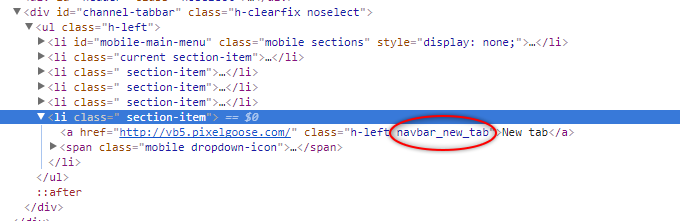
- So the only thing you need to do now is to add a new css-rule with the “navbar_” class to the css_additional.css template of your theme after the last curling brace. Your code may look like this:
#htmlTag #channel-tabbar ul li a.navbar_YOURCLASS:before {
                background-image: url("PATH_TO_YOUR_ICON");
                background-repeat: no-repeat;
                background-position: left top;
}
Don’t forget to replace “PATH_TO_YOUR_ICON” with the actual icon path like “images/quarto/YOUR_COLOR/css/MY_ICON.png” - Save the template and refresh your forum page.